 Break.
Fix.
Learn.
Understanding the Xiegu G-90 v1.80+ Band Pass Filter
I recently got a Xiegu G90 radio with the latest v1.81 firmware. The way the band pass filter works is different from the v1.79 and earlier firmware. The printed manual that came with it still referenced the older style filter settings, and I could not find any videos or blogs that explained the new settings clearly, so I am hoping this post will help out some others.
I did find this one video from M0FXB where he shows it in action, but still does not really explain what’s going on or how it works. As I continued looking for a better explanation, I finally spotted a comment on a YouTube video that the filters now work similarly to the Icom twin filter settings. I have never operated an Icom radio (I have never operated any radio other than the G90 that I have had for 3 weeks and a couple of handhelds), so that did not mean much to me immediately, but that was the lead I needed. A little bit more searching and I found a great video that explains how the Icom twin filters work. Feel free to give it a watch.
Armed with that knowledge, I now have at least a basic understanding of how this new Xiegu filter works.
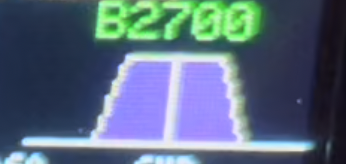
When you first start the G90 up, the filter should look like the image to the right.
If you’ve already changed it and it does not look like this, you can reset it by pressing FUNC and then pressing the CMP button and then separately pressing the NB button. In this default config you will see a purple trapezoid, and, if you are in LSB or USB mode, above the trapezoid you will see B2700. This number is the bandwidth that the filter is currently passing, which by default is 2700Hz in either of the SSB modes (you will see different values for other modes). In the center of the trapezoid is a white whisker. That whisker represents your tuned frequency.
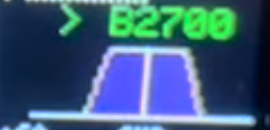
Now, to adjust it, first press the Multi-function Control (MFC). That is the knob on the lower-left side of the display. A little greater-than symbol will appear next to the bandwidth above the trapezoid so it will say >B2700.
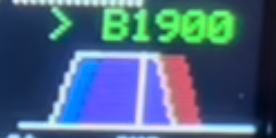
Then rotate the MFC knob in either direction. The bandwidth number should decrease and you will see that a blue trapezoid outlined in white has shifted in the direction you turned the knob. A shadow of a red trapezoid will be left behind where the blue trapezoid previously stood. In this picture I turned the knob counter-clockwise and moved the blue trapezoid to the left.
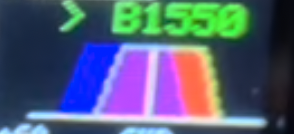
Press the MFC knob a second time and the red trapezoid will be outlined in white showing that this is now the active one. Rotate the knob in the opposite direction to shift the red trapezoid away from the blue trapezoid to trim the bandwidth further. In this picture I have turned the knob clockwise and cut the pass band width down to 1550Hz
Once you’ve got it set up the way you want it, long-press the MFC to save it (the > will disappear from next to the bandwidth) and return the MFC dial’s operation to whatever you have it normally configured to do.
You may also notice that as you move the filters, the blue rectangle in the spectrum display will change accordingly, getting wider or narrower or shifting a little in either direction.
If you did not watch the Icom video I linked above, here’s what’s actually happening:
The area in which the two trapezoids overlap (the purple area) represents the bandwidth that is allowed through.
When you shift one trapezoid away from the other, the area that overlaps gets smaller, representing a smaller bandwidth that is allowed to pass.
If you move both trapezoids in the same direction you can shift where the filter sits relative to the tuned frequency, and if you move them in opposite directions you increase or decrease the width of the pass band.
In this way you can tune out interference from nearby stations but also you can cut some of the noise that comes through the speaker that fatigues your ear and makes it harder to hear the station that you are tuning.
I have found that for SSB, trimming the bandwidth to somewhere between 1800Hz and 2000Hz and shifting it a bit off-center (which way depends on whether you’re in LSB or USB) gives me a good balance between reducing the noise but allowing the voices to still sound natural. If you cut the bandwidth too far, voices start to sound robotic or squeaky and you will want to open it back up a little or shift the filter back towards the center.
I did notice as I was researching for this post that while the Rev.05 manual that came with my G90 still describes the old style of filter operation, but the cheat sheet (PDF) describes the new style. The latest manual online still describes the old style.
If you would like to see a video explanation, please take a look at the YouTube video that I posted here.
Good luck!